
With the latest version of DevExtreme, v24 or v25, you would see the following error if it involves DevExtreme AngularJS components.
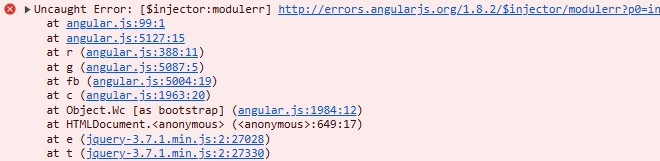
The DevExtreme team announced end-of-life for DevExtreme components based on AngularJS, and they are not supported from DevExtreme v24.1. It now uses a modern and secure Angular framework, which is based on TypeScript and MVC architecture. If the project were based on AngularJS, you could either choose to convert it to Devextreme jQuery or Devextreme Angular. For quick conversions and if the application involves more dependency on jQuery, you can choose to convert to DevExtreme jQuery.
Conversion of the DevExtreme Grid from AngularJS to DevExtreme jQuery is discussed below:
Html Code for Devextreme AngularJs
| <div id=”myGridContainer” ng-app=”myGridApp” ng-controller=”myGridController” class=”hideheader col-md-12 col-sm-12 col-xs-12 nopadding”>
<div id=”myGrid” dx-data-grid=”gridSettings“> </div> </div> |
Can be replaced as follows
| <div id=”myGridContainer” >
<div id=”myGrid“> </div> </div> |
Script code for creating a DevExtreme grid using AngularJS:
| var myApp = angular.module(“myGridApp“, [“dx”]);
myApp.controller(“myGridController“, [“$scope“, “$http“, function ($scope, $http) { $scope.gridSettings = { onInitialized: function (e) {…. }, onContentReady:function(e){….}, columns:[{…}], ………………….. }]); angular.element(document).ready(function () { angular.bootstrap(document.getElementById(“myGridContainer“), [‘myGridApp‘]); }); |
Conversion of can of the above can be done in the following manner :
| $(“#myGrid”).dxDataGrid({
onInitialized: function (e) {…. }, onContentReady:function(e){….}, columns:[{…}], }); |
If you are using a grid instance in the following manner:
$scope.gridInstance;
$scope.gridSettings = {
bindingOptions: { dataSource: “<data>” },
onInitialized: function(e) {
$scope.gridInstance = e.component;
}
};
This can be simply modified as
var gridInstance = $(“#myGrid“).dxDataGrid({
dataSource: “<data>”,
}).dxDataGrid(“instance”);
The instances of code referring to a scope instance, such as
| var key = $scope.gridInstance.getKeyByRowIndex(options.rowIndex);
$scope.gridInstance.selectRows([key], true); |
Can be replaced as
| var key = gridInstance.getKeyByRowIndex(options.rowIndex);
gridInstance.selectRows([key], true); |
The code for loading the dataSource based on $http
| dataSource: new DevExpress.data.CustomStore({
key: ‘id’, load: function (loadOptions) { return $http({ method: “GET”, url: <url>, headers: { “Authorization”: token }, }).then(function (response) { Return { data: response.data, totalCount: response.data.length }; }, function(error) { throw “Data Loading Error: ” + error.statusText; }); }, }) |
Can be replaced as
| dataSource: new DevExpress.data.CustomStore({
key: ‘id’, load: function (loadOptions) { var d = $.Deferred(); $.ajax({ method: “GET”, url: <url>, headers: { “Authorization”: token }, success: function (data) { d.resolve({ data: data, totalCount: data.length }); }, error: function (xhr) { d.reject(“Data Loading Error: ” + xhr.statusText); } }); return d.promise(); }, }) |