
We recently undertook the upgrade from Totara 13 to Totara 17, and while the new version brings several functional and performance improvements, the transition came with several significant challenges, especially for teams working with customized environments.
Below is a detailed breakdown of the major issues, what caused them, and how we were able to resolve or work around them.
Plugin Conflicts and Failures
- Issue: We encountered this issue while editing a course through the course settings. For older courses that contain the Seminar activity, an exception error message was displayed, preventing us from editing the course or its activities.
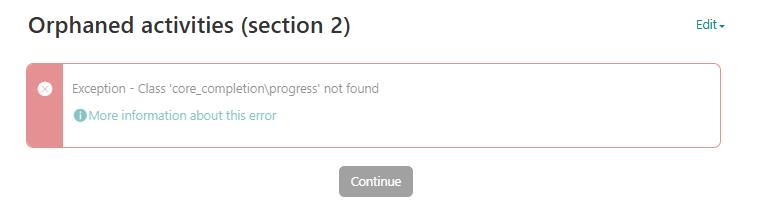
- Cause: Deprecated functions and API changes between v13 and v17, and Class inheritance issues and changes in service architecture.
- Fix: We reviewed the Totara Developer Upgrade Notes and examined the code to identify which plugin was causing the issue. In our case, the problem was related to the Subcourse plugin. We replaced it with version 10.1, which is compatible with Totara 17, and that resolved the issue.
Custom Code Malfunctions
- Issue: Customizations stopped working, including local plugins, modified features, or extended core classes.
- Cause: As discussed above, it’s possible that some deprecated functions and methods were used, which are no longer supported in the newer version. Additionally, customizations made to default or existing plugins may be lost during the plugin upgrade process, which can also lead t
- Fix: To fix this, the first and most important step is always to keep a backup of all customizations and plugins, especially if any changes have been made to existing or local plugins that are essential to your system. It’s also important to use functions and methods that are stable and unlikely to be deprecated in future versions. Always refer to the latest developer documentation before implementing any custom logic. Moving forward, to facilitate future upgrades more easily and reliably, we will thoroughly document all custom changes and utilize version control to track them.
Reporting Issues (Report Builder)
- Issue: This was one of the major issues we faced, particularly with saved reports and saved search reports. Many existing reports failed to display correctly or lost their filter functionality. As a result, all saved search reports were not displaying any results and showed a warning message when attempting to view them.
- Cause: The Report Builder was significantly upgraded, including changes to the layout and filter handling logic. The saved reports were created with multiple filter values, such as category checkbox options in the old version, but in the new version, these have been changed to select list values. This change caused compatibility issues with existing reports.
- Fix: To fix this issue, we needed to rebuild the reports using the updated Report Builder interface and configure them based on the new select list values. After that, we created new saved reports and saved search reports accordingly.
Language Pack & String Override Loss
- Issue: Custom labels and terms were reverted to default values post-upgrade.
- Cause: As discussed above, similar issues occurred with plugin customizations and language packs, which were overwritten during the upgrade. Custom string overrides were either stored in the wrong locations or were not backed up properly.
- Fix: We restored the custom language packs from the backup and ensured that future overrides are stored correctly under /lang/en_local/. Also, make sure that any changes made through the Totara UI are reflected on the Language customization screen; if not, they may have been lost during the upgrade. Additionally, review other plugins to verify if any custom language changes were applied there, as those may need to be reapplied as well.