
We can build many real-time applications such as chat applications, multiplayer games, financial trading platforms, and collaboration platforms using WebSockets with AWS API Gateway, Lambda, and dynamoDB.
In this blog we will learn how to build real-time applications using WebSockets with AWS API Gateway and Lambda involves several steps. Here’s a system design-level wireframe overview of the process:
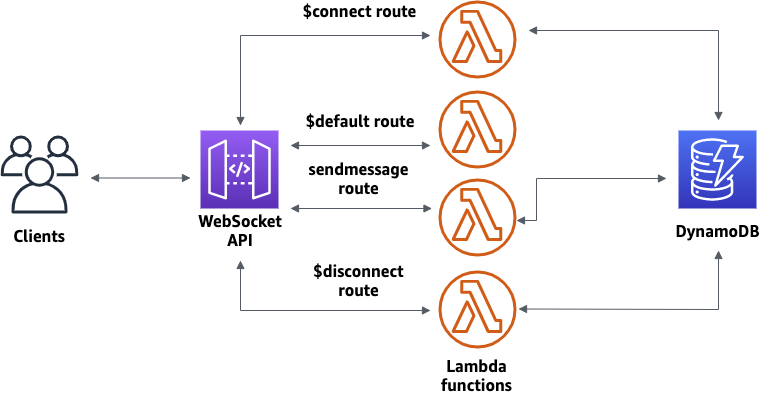
- 1. Set Up AWS Services:
- a. AWS Lambda: Create Lambda functions to handle WebSocket connections, messages, and disconnections.
- b. Amazon API Gateway: Set up a WebSocket API in API Gateway to handle WebSocket connections, route messages to Lambda functions, and manage connections.
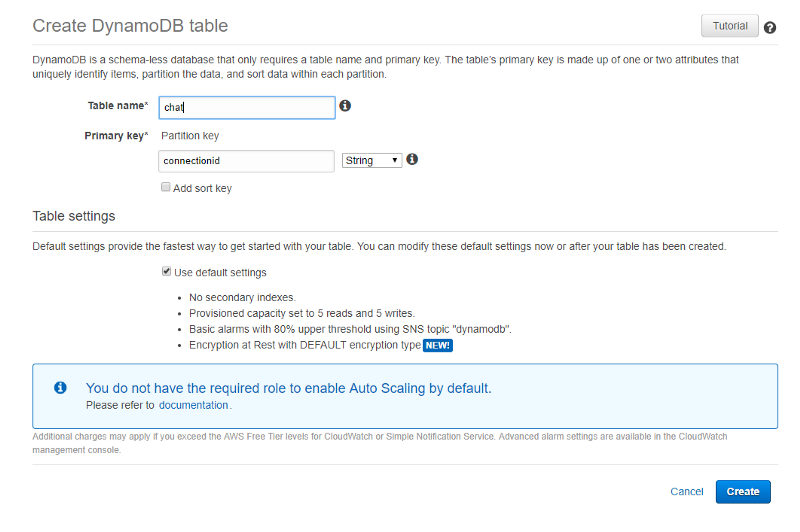
- c. AWS Dynamodb: Create a table in dynamodb to store connection id”s and messages.
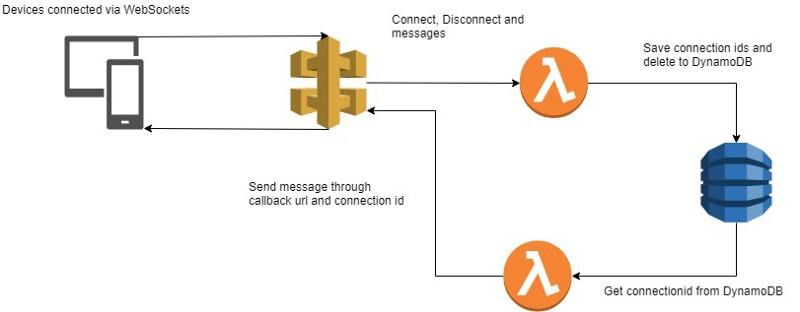
- 2.Configure API Gateway WebSocket API:
- a. Create a new WebSocket API in API Gateway.
- b. Define routes and integration points for handling connection, message, and disconnection events.
- c. Set up permissions and security settings for the WebSocket API.
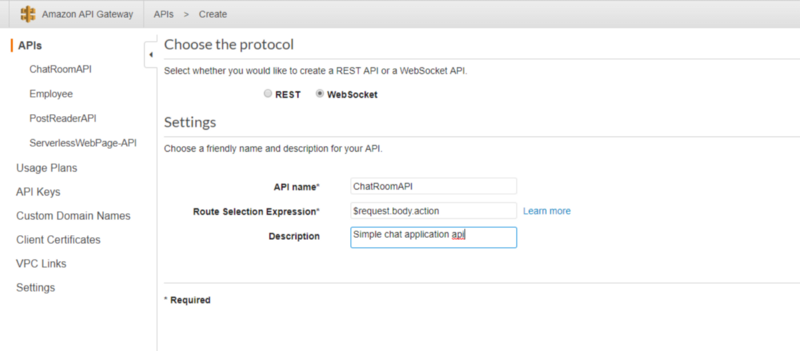
- 3. Develop Lambda Functions:
- a. Write Lambda functions to handle WebSocket connection events, incoming messages, and disconnections.
- b. Implement business logic for processing messages and interacting with other AWS services as needed.
- c. Ensure that Lambda functions are stateless and can handle multiple concurrent connections.
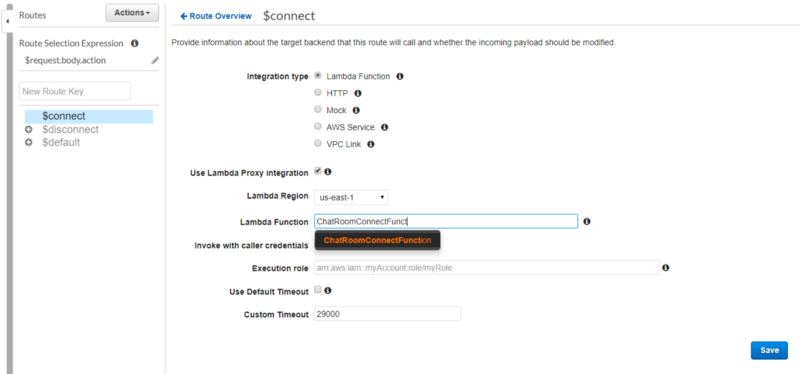
- 4. Deploy Lambda Functions:
- a. Package Lambda functions along with any dependencies into deployment packages.
- b. Deploy Lambda functions to AWS using the AWS Management Console, AWS CLI, or AWS SDKs.
- 5. Integrate Lambda Functions with API Gateway:
- a. Configure integration between API Gateway routes and Lambda functions.
- b. Define mappings between WebSocket message payloads and input parameters for Lambda functions.
- c. Test the integration to ensure that messages are routed correctly to Lambda functions.
- 6. Handle Connection Events:
- a. Implement logic in Lambda functions to handle WebSocket connection events (e.g., onConnect).
- b. Perform any necessary initialization or authentication steps for new connections.
#to Handle connection event lambda function code
import json
def connect_handler(event, context):
connection_id = event[‘requestContext’][‘connectionId’]
# Save the connection ID to a database or cache
return {
‘statusCode’: 200,
‘body’: json.dumps({‘message’: ‘Connected successfully’})
}
- 7. Handle Message Events:
- a. Write Lambda functions to process incoming messages from WebSocket clients.
- b. Implement business logic to handle different types of messages and perform relevant actions.
#to Handle on message event lambda function code
def message_handler(event, context):
connection_id = event[‘requestContext’][‘connectionId’]
data = json.loads(event[‘body’])
message = data.get(‘message’)
# Optionally, you can store messages in a database for persistence
return {
‘statusCode’: 200,
‘body’: json.dumps({‘message’: ‘Message received successfully’})
}
- 8. Handle Disconnection Events:
- a. Implement logic to handle WebSocket disconnection events (e.g., onDisconnect).
- b. Clean up resources associated with disconnected clients and update application state as needed.
#to Handle Disconnection event lambda function code
def disconnect_handler(event, context):
connection_id = event[‘requestContext’][‘connectionId’]
# Remove the connection ID from the database or cache
return {
‘statusCode’: 200,
‘body’: json.dumps({‘message’: ‘Disconnected successfully’})
}
- 9. Store communication data:
- a. Create a table in aws dynamodb.
- b. Store the connection id when chat starts and message for communication history.
- 10. Testing and Monitoring:
- a. Test the WebSocket API using WebSocket client tools or browser-based WebSocket clients.
- b. Monitor API Gateway and Lambda metrics to ensure performance and scalability.
- c. Set up logging and monitoring to track WebSocket connections, messages, and errors.
- 11. Optimization and Scaling:
- a. Optimize Lambda functions for performance and cost by fine-tuning memory allocation and concurrency settings.
- b. Configure API Gateway settings for scalability, such as connection throttling and caching.
- c. Monitor usage patterns and scale resources up or down as needed to handle varying loads.
By following these steps, you can build and deploy real-time applications using WebSockets with AWS API Gateway and Lambda, enabling bidirectional communication between clients and serverless backend functions.